|
|
|
|
 |
 |
|
JACKPOT SLOTS accessory
for iPhone® and iPod touch®
|
|
|
|
 |
 |
|
USER GUIDE
Thank you for purchasing the Jackpot Slots accessory, a New Potato product.
Jackpot Slots brings an entirely new hands-on experience to your iPhone or iPod touch by transforming your device into a casino-style slot machine.
Download free Jackpot Slots app from iTunes App Store and then read on to let the fun begin!
|
 |
CONNECT TO THE DOCK
To play Jackpot Slots place your iPhone or iPod touch onto the Jackpot Slots dock and gently press your device onto the 30 Pin connector.
The included cable can be used to charge or sync your device with any external charger or personal computer. Jackpot Slots can be played with or without an external power source connected to the dock.
When playing Jackpot Slots, simply pull the one-arm bandit lever forward until the wheels begin to spin, then let it go.
To undock your device, pull the one-arm bandit lever all the way forward and the dock will disconnect your device from the 30 pin connector.
|
 |
|
|
|
 |
 |
|
RUNNING THE APP
|
|
|
 |
 |
|
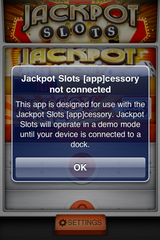
If you open Jackpot Slots before connecting your device, you will see a screen informing you that Jackpot Slots will operate in demo mode until connected.
Demo mode will allow you to check out the basic game play by automatically starting a spin when a game is selected.
To play the complete Jackpot slots, connect to the dock and use the one-arm bandit lever.
|
|
|
|
 |
 |
|
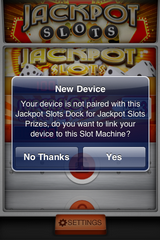
After connecting your device to Jackpot Slots for the first time, you will see a “New Device” screen that will ask whether you want to link with this Jackpot Slots dock.
Linking your iPhone/iPod touch to a dock is optional, but will allow you to enter Jackpot Slots prize drawings after winning 50,000 credits in the Jackpot Slots Game.
If you choose to link later, credits earned on your device will be reset to 100 when you do link.
|
|
 |
 |
|
You will be able to connect more than one device to your dock and play the complete game, but only one device is eligible per dock to register in the Jackpot Slots Prize Drawing after reaching 50,000 credits in the Jackpot Slots game.
|
 |
 |
|
REVIEW THE RULES OF THE JACKPOT SLOTS PRIZE DRAWINGS
|
|
|
 |
 |
|
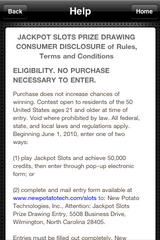
If you choose to link your device to your dock to qualify for the prize drawing, you will have an opportunity to review the complete rules, terms and conditions of the Jackpot Slots Prize Drawing.
Press “Terms and Conditions” to review the complete Jackpot Slots Prize Drawing Consumer Disclosure of Rules, Terms and Conditions.
|
|
|
 |
 |
|
After viewing rules, terms, and conditions, press back or home.
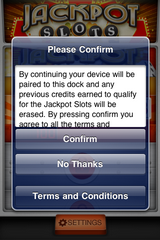
Press “Confirm” to verify that you want to link your iPhone or iPod touch to this Jackpot Slots dock and agree to the terms and conditions of the prize drawing.
Press “No Thanks” if you do not want to link to this dock and just want to play the Slot games in the application using this dock.
|
|
 |
 |
|
Once you have linked your application to a particular dock, you will not have do anything further each time you play, unless you choose to re-link to another dock at some time in the future. Each time you link, your accumulated score for the Jackpot Slots game will be reset to 100 credits.
|
 |
 |
|
PLAY THE JACKPOT SLOTS GAME
|
|
|
 |
 |
 |
 |
|
Now you are ready to play the Jackpot Slots game!
Another game, Super Slots, is also unlocked and can be selected for a more challenging game with tougher odds than Jackpot Slots.
To launch a game, select it with a tap from the game selection screen.
|
|
|
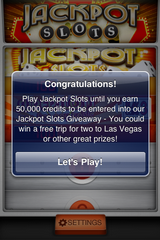
Once you reach 50,000 credits in the Jackpot Slots game, you qualify to register in the Jackpot Slots Prize Drawing!
Registering adds you to the prize drawing pool and gives you the chance to win great prizes each month including a Reel Casino Getaway.
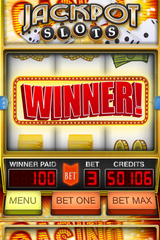
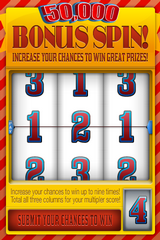
When you reach 50,000 credits, you get an additional bonus spin to increase your chances of winning.
|
|
|
|
 |
 |
 |
 |
|
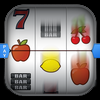
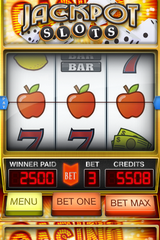
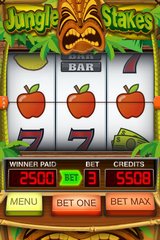
Play jackpot Slots - bet one, two or more credits, then pull the handle to spin the wheels.
Don’t pull too far or you may eject your device from the dock.
You can view the pay table with a single tap to the top of the game screen.
Press menu to return to the game selection screen.
|
|
|
Spin the wheels one more time and multiply your chances in the drawing by up to nine times!
Add up the numbers shown and that’s how many times your entry will be submitted to the Prize Drawing contest.
Hit 3-3-3 to increase your chances of winning by nine times!
|
|
|
 |
|
|
|
 |
 |
|
REGISTER TO WIN IN THE JACKPOT SLOTS PRIZE DRAWING
|
|
|
 |
 |
|
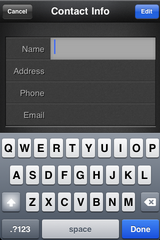
An entry screen will open asking you to enter your contact info for your registration into the prize drawing.
Enter your name, address, Phone number and current Email address.
Check the entered information carefully to make sure it is correct
Your contact information will be kept private and will not be shared or sold.
|
|
|
 |
 |
|
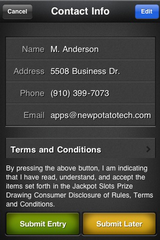
You get another chance to review the Terms and Conditions of the Jackpot Slots Prize Drawing.
Confirm your entry and you will be registered automatically in the next Jackpot Slots Prize Drawing.
Prize drawings are monthly and each drawing you could be chosen at random to win any of the select prizes or one of the grand prize Reel Weekend Casino Getaways.
Good Luck!
|
|
 |
 |
|
You will also be offered the option to submit your entry at a later time. As long as you do not reset your Jackpot Slot score by linking to another jackpot Slots dock, you can complete your entry at another time.
|
 |
 |
|
GAME SELECTION AND MORE GAMES
|
|
|
 |
 |
|
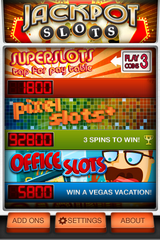
Once you have reached 50,000 credits in Jackpot Slots, the other slot machines will be unlocked and available for play.
The current credit tally for each game will be shown on the selection screen.
Scroll up and down and then tap on the game you wish to play.
Buttons at the bottom of the screen lead to settings, about, and add on screens where you can configure your setup.
|
|
|
 |
 |
|
Five games you can play:
- Jackpot Slots
- Super Slots
- Jungle Stakes
- Pixel Slots
- Office Slots
Each game has its own challenges and strategies to beat the house odds and win big!
Watch for free app updates from the iTunes App Store with additional games and features.
|
|
 |
 |
|
GAME SETTINGS, ABOUT AND MORE...
|
|
|
 |
 |
|
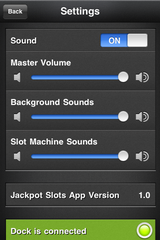
You can setup your slot machine to set the level and mix of sounds for the game.
There is also an indication that the dock is connected or disconnected, this image shows the dock is working normally and the version of the app is 1.0.
Updates to the app including additional slot games and special features will be released through the iTunes App Store periodically.
|
|
|
 |
 |
|
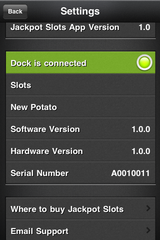
You can slide the screen up and check information that is sent from the dock to the application.
This shows the software and hardware version of the slot machine dock and its serial number.
In the unlikely case you have a technical problem with your dock, this information will be useful in providing technical support or service to you.
|
|
 |
|
|
|
 |
 |
 |
 |
 |
 |
|
 |
 |
 |
 |
 |
|
JACKPOT SLOTS PRIZE DRAWING
|
|
|
|
Click the button below to review complete rules, terms, and conditions. All federal, state, and local laws and regulations apply.
|
|
|
|
 |
|
|
|
|
|
OTHER INFORMATION
|
|
|
|
FCC Statement for Jackpot Slots Unit
This device complies with part 15 of the FCC Rules. Operation is subject to the following two conditions: This device may not cause harmful interference and this device must accept any interference received, including interference that may cause undesired operation.
©2010 New Potato Technologies, Inc. All Rights Reserved. New Potato, New Potato logo, appcessory, and Jackpot Slots are trademarks of New Potato Technologies, Inc. Apple, iPod, iPhone, iPod touch, and iTunes are registered trademarks of Apple Inc., registered in U.S. and other countries.
The Made for iPod and Works with iPhone logos mean that an electronic accessory has been designed to connect specifically to iPod and iPhone and has been certified by the developer to meet Apple performance standards. Apple is not responsible for the operation of this device or its compliance with safety and regulatory standards.
|
|
|
|